Wearable safety devices or smartphone check-ins for independent seniors
@theseniorsupporter
November 20, 2026 · 7 min read
Staying connected while living independently
For older adults who want to keep their independence, the question of how to stay safe without constant supervision is a practical one. Families often look for a way to know that a parent or relative is okay without intruding on their daily life. Two broad approaches have become common: wearable safety devices that the person carries or wears, and smartphone-based check-in systems that rely on the phone the senior already uses. Each has its own strengths and limitations, and the right choice depends on the person's habits, health, and comfort with technology.
Wearable safety devices: always within reach
Wearable safety devices are designed to be kept on the body, usually as a pendant, wristband, or clip-on. They typically include a button that the wearer presses to call for help, and many now include automatic fall detection. The main advantage is that help can be summoned without needing to find a phone or unlock a screen. For someone who has mobility concerns or a history of falls, this can be a reassuring option.
Most wearable devices use cellular or GPS technology to send an alert to a response centre or directly to family members. Some models also allow two-way voice communication, so the wearer can speak to a responder without needing a separate phone. This can be valuable if the person has difficulty speaking loudly or clearly after a fall.
Battery life varies widely. Some devices need charging every day, while others last a week or more. The charging routine is a factor to consider, because a device that runs out of power is no help in an emergency. Some seniors find it easy to plug in a device overnight, while others may forget or find the process fiddly.
Another consideration is comfort and wearability. A pendant worn around the neck might feel heavy or get caught on furniture. A wristband can be more comfortable but may be taken off for bathing or sleeping, when falls are more likely. Water resistance is important if the device will be worn in the shower or while washing dishes. Not all devices are waterproof, so checking the rating matters.

Smartphone check-ins: using what is already there
Smartphone-based check-in systems use the senior's existing phone, often through a simple app or a shared calendar reminder. The idea is that the person sends a quick message, makes a brief call, or taps a button at set times to let family know they are okay. If a check-in is missed, the family can follow up.
This approach has the advantage of using a device the person already knows and carries. There is no extra gadget to remember, charge, or wear. For seniors who are comfortable with a smartphone and use it regularly for calls, messages, or photos, a check-in system can feel natural and unobtrusive.
Location sharing is another feature that can be added through smartphone apps. With the person's permission, family members can see their location on a map. This can be useful if the senior tends to wander or if there is concern about them getting lost while out for a walk. However, location sharing requires the phone to be on and connected to data, and the person must be willing to share their whereabouts.
The main drawback of a smartphone-based system is that it depends on the phone being charged, carried, and working properly. If the phone runs out of battery, is left at home, or the person forgets to check in, the family may worry unnecessarily. Also, if the senior has cognitive decline, they may forget to send a check-in or may not recognise the phone's alerts.
Comparing the two approaches side by side
When weighing wearable devices against smartphone check-ins, several factors come into play. The table below summarises the key differences, but the right choice depends on the individual.
- Ease of use: Wearable devices are usually simpler, with a single button. Smartphone check-ins require remembering to send a message or tap an app.
- Reliability: Wearables are designed for emergencies and often have backup batteries. Smartphones depend on battery life and network coverage.
- Comfort and acceptance: Some seniors find wearables stigmatising or uncomfortable. A smartphone is already part of their daily routine.
- Cost: Wearable devices often have a purchase cost and may require a monthly subscription. Smartphone apps can be free or low-cost.
- Features: Wearables typically include fall detection and SOS alerts. Smartphones offer location sharing, video calls, and more flexible communication.
For someone who is active and rarely alone, a smartphone check-in system may be sufficient. The person can send a quick "I'm fine" message after a walk or a trip to the shops. If they miss a check-in, the family can call or visit. This works well when the senior is reliable with their phone and has no major health concerns.
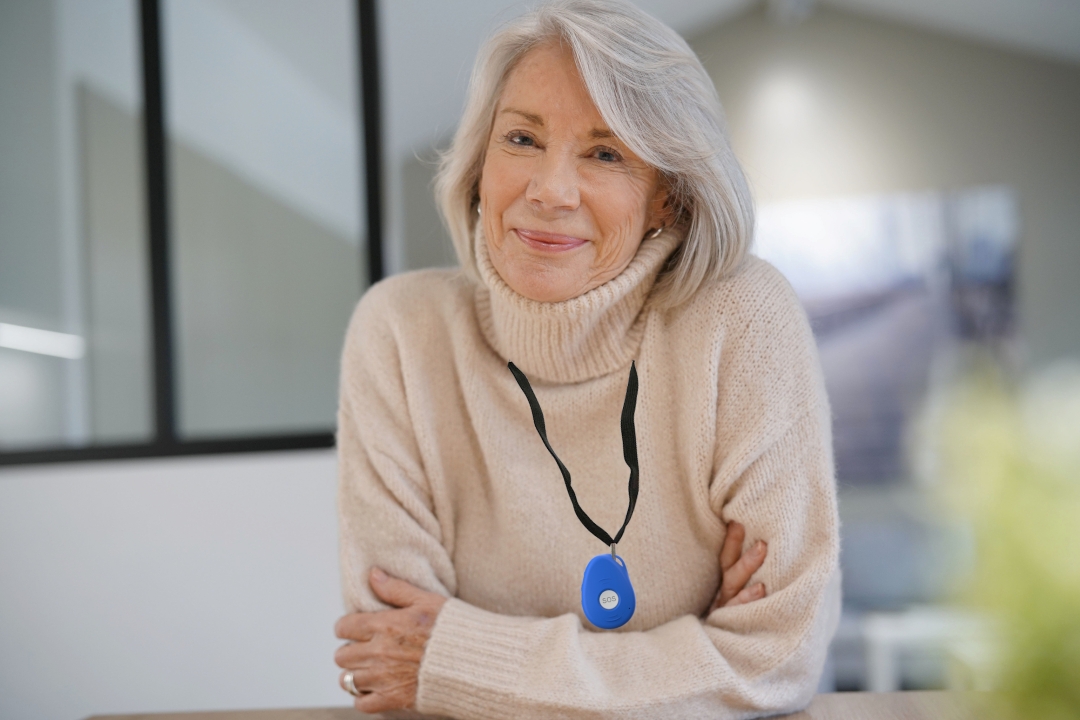
For someone who lives alone, has mobility issues, or is at risk of falls, a wearable safety device offers more direct protection. A senior safety device worn on the wrist or around the neck means that help can be called even if the person cannot reach a phone. This can make the difference between a minor incident and a serious situation.
When each option suits best
There is no single answer that fits everyone. The choice depends on the senior's lifestyle, health, and comfort with technology. Here are some scenarios to help decide.
Wearable devices are a strong choice when:
- The person has a history of falls or is at high risk of falling.
- They live alone or spend long periods without visitors.
- They are not comfortable using a smartphone or often forget to carry it.
- They want the reassurance of being able to call for help with one press.
- The family wants automatic fall detection and location tracking.
Smartphone check-ins work well when:
The person is already confident with their phone and uses it daily. They are willing to send a brief check-in at agreed times, and the family trusts them to do so. This approach suits seniors who are generally healthy, active, and socially engaged. It also works for families who prefer a low-cost solution and are comfortable with occasional missed check-ins.
Some families combine both approaches. A wearable device provides emergency backup, while a smartphone check-in system handles daily reassurance. This gives the senior independence and the family peace of mind without being intrusive.
Practical considerations for choosing a system
Before deciding, it helps to think about a few practical details. Battery life and charging routines matter more than most people expect. A device that needs daily charging might be forgotten, while one that lasts a week can be charged on a set day. Water resistance is also important if the person will wear the device while bathing or swimming.
Privacy is another factor. Some seniors are uneasy with location tracking or having their movements monitored. It is important to discuss this openly and get their agreement. The goal is to support independence, not to control or watch over them.

Family check-ins work best when they are part of a daily routine. A morning call or a text after lunch can become a natural habit. The key is consistency, not frequency. A single missed check-in should trigger a gentle follow-up, not panic.
Making the decision together
The best approach is one that the senior feels comfortable with and will actually use. A device left in a drawer or a phone left on silent is no help at all. Involving the senior in the decision, discussing the options, and trying a trial period can help find the right fit.
For many families, a combination of a wearable safety device and a smartphone check-in system provides the most complete coverage. The wearable handles emergencies, while the check-in system handles everyday reassurance. This layered approach respects the senior's independence while giving the family confidence that help is never far away.